





Garmin golf stats: import your rounds, know what to work on
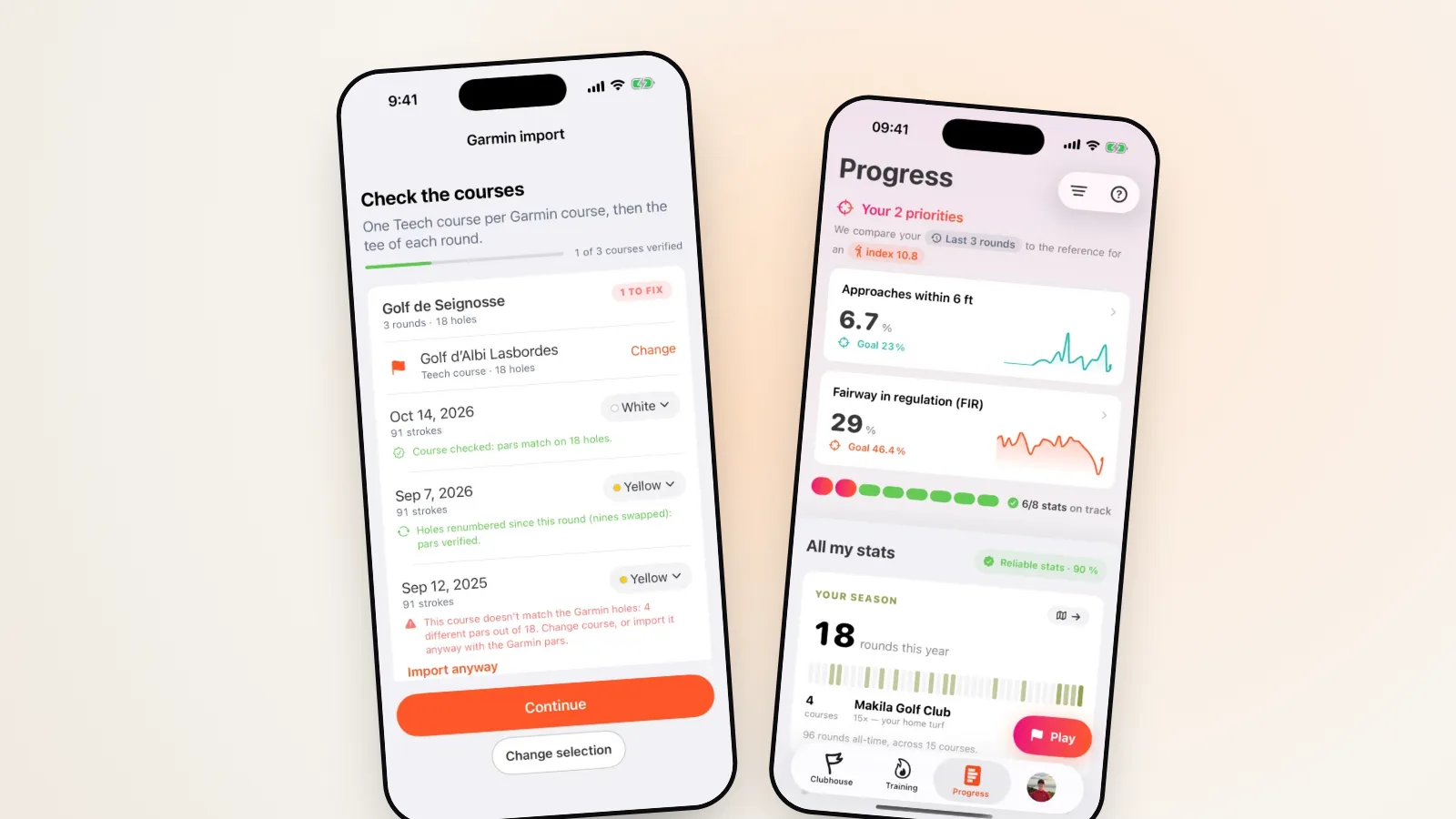
Your Garmin watch records your rounds. Teech Golf tells you what to do with them. Since version 4.2, you can import your Garmin Golf rounds into Teech Golf: score, putts, penalties, and even every shot with its club when your watch recorded it. They then go through the same analysis as rounds played with the app, so you finally know where you lose shots and what to work on first.
The essentials in five points
- A diagnosis, not numbersYour two priorities, compared with golfers at your handicap.
- What you gainReal club distances, dispersion, a training plan.
- Three stepsPick your rounds, check the courses, done.
- What is importedScore, putts, penalties, drive direction, shots and clubs.
- Future rounds tooNew rounds join your history.
Numbers or a diagnosis?
After a round, your watch gives you numbers: 92, 36 putts, 5 fairways hit. Accurate, but it doesn’t answer the only question that matters: what do I practise this week to shoot 88?
To answer it, you need a comparison. Not with the pros (here’s why that’s a false good idea), but with golfers at your level. That’s what Teech Golf does: every stat is set against what a player at your handicap achieves, and the two gaps costing you the most shots become your priorities.
An example, the one in the image at the top: over their last rounds, this golfer finishes within 2 m of the hole on 6.7% of approaches, while golfers at the same handicap manage 22%. And they hit 29% of fairways, against 46% expected. Two clear projects, instead of a vague “I need to work on my short game”.
Until now, getting that diagnosis meant playing with Teech. With the import, the rounds you already played with your watch count too, sometimes whole seasons. No need to start from scratch.
What Teech gets out of your Garmin rounds
Once imported, your rounds count exactly like rounds played with the app. They feed:
- your two priorities in Progress, each explained by the stat that flagged it (see how Progress works);
- all your stats by family: tee shots, approach, short game, putting, scoring, with their month-by-month trend and the level expected at each handicap;
- your real distance per club, measured on the course from the shots your watch recorded, not on a range mat;
- your dispersion off the tee and per club: left, right, short, long;
- your training plan: sessions built from your priorities, with video drills (more on turning stats into practice).
The more rounds you have, the more solid the analysis: Teech shows a reliability score for every stat. A full season gives a far truer picture of your game than three rounds.
The Garmin import is part of Teech Premium, with a 7-day free trial: enough to import your season and see your priorities before paying anything.
Import your rounds in three steps
The import lives in Profile › Game › Garmin import.
- Pick your rounds. The 20 most recent are ticked, and you can add others. Rounds already in Teech are flagged and never imported twice.
- Check the courses. Each course is matched to a course in the Teech database, with its tee. If the pars don’t match (holes renumbered, nines swapped), Teech detects it and puts the holes back in order, or lets you pick another course.
- Match your clubs (only if your watch recorded your shots): which club in your Teech bag matches each club. Once and for all.
That’s it: your rounds show up in your history and in Progress. The detailed guide is in our help centre.
Which data is imported?
For every hole of your completed 9- or 18-hole rounds:
| Data | What Teech does with it |
|---|---|
| Score and putts | Your score, greens in regulation and putting average |
| Penalties | Shots lost out of bounds or in the water |
| Drive direction | Fairways hit and tee-shot dispersion |
| Shots and clubs | Your real distances and dispersion per club |
If your watch didn’t record your shots, the round comes in simple mode, like a detailed scorecard. If it did, it comes in shot by shot, each shot placed on the hole map with its club, like a round played in “At my ball” mode.
Teech doesn’t take averages or a handicap calculated elsewhere: it recalculates everything from your rounds, with its own method, so all your rounds are compared on the same basis.
What about your next rounds?
After the first import, your new Garmin Golf rounds join your history when you open Teech Golf, and a banner in the Clubhouse lets you know. If a course or a club is new, the round waits for you in “Rounds to complete”.
You play as usual, watch on your wrist, and find the diagnosis in Teech after the round.
Frequently asked questions
Is the import free? It’s part of Teech Premium, like the full analysis it feeds. The 7-day free trial is enough to import your rounds and see your priorities.
Which rounds are imported? Completed 9- or 18-hole rounds. Rounds in progress or abandoned aren’t offered.
What if I import the same round twice? Nothing happens: rounds already there are marked “Already in Teech”.
I also play with Teech on my iPhone or Apple Watch. Do they mix? Yes, that’s the point: all your rounds end up in the same history and the same analysis.
Can I turn off automatic import? Yes, at any time from the Garmin import page. Rounds already imported stay, and you can delete one like any other round.
Garmin and Garmin Golf are trademarks of Garmin Ltd. or its subsidiaries. Teech Golf is not affiliated with, endorsed by or sponsored by Garmin.